Flex Bug with List and toString

I stumbled on this simple and interesting bug with the List component in Flex: Adding an item with a label of “toString” to a List component will break the List, and take down much of your application with it. Just add the following to a new or existing mxml app (tested in Flex 2.0.1):

<mx:List dataProvider=”[‘toString’]”/>

I find this bug interesting because despite thinking it over last night (when I should have been sleeping), I still can’t think of a good reason for why it occurs. The obvious culprit is the correlation between the string value, and List calling toString to get the label, and this somehow causes a conflict. I can’t think of a scenario where this would cause an issue though – calling toString on a string will merely return the string value, regardless of what that value is. I even tested (amongst other things) calling toString on a “toString” String (wow, convoluted) to ensure this wasn’t a deeper player level bug.

I haven’t had time to track down the cause in the framework yet, but I plan to soon. It’s bugging me, because I can’t see why there would be any correlation between this specific value of the label, and the rendering of the list item. I also have a programmer’s natural aversion to edge cases (what if my user adds an item named “toString”, and my whole app blows up?).

Hopefully there will be more, in-depth blog entries to come in the not too distant future. There’s been a lot of interesting stuff going on here at gskinner.com, including our work developing the v3 components set, continued work on our computer vision software, and our expansion into doing Flex work, which I’d love to blog about. Alas, my time is very short at the moment, between work, conferences, traveling, and building a new house (originally designed in Flash, though that’s a story for another entry).

The Coolest Flash 3D Demo Ever!

Last week, I was hunting around for a compelling speed comparison demo that I could use to show how much faster AS3 execution was than AS2 for the MacWorld Flash Forward keynote. I wanted something exciting and very visual that ran in both AS2 and AS3. Remembering that the awesome open source Paper vision 3D project by Carlos Ulloa and John Grden had recently been updated to AS3, I pinged John to see whether he could put together a cool demo in the meager 4 days I had before the session. Let me tell you… the man came through with gusto! Not only did he throw together an amazing demo contrasting AS2 rendering 900 faces at 5fps versus AS3 rendering almost 8000 faces at 25fps, but he did it in only two days, while doing normal work and accommodating all of my anal retentive requests (admit it John, those requests were the cilantro in your salsa *grin*).

The demo totally blew away the audience at MacWorld. Not only is it an amazing speed demo, but it’s the coolest piece of 3D I have seen to date in Flash. 7 x-wing fighters, 7 tie fighters, 1 death star, and Endor all flying around a star field with a chase-plane style camera.

If you want to see a stunning example of AS3’s speed gains, or just want to check out where 3d in Flash is headed, you should click over to John’s blog. Then, head over the OSFlash page for the Papervision3D project for more great demos and info.

(btw – the demo runs beautifully in full screen mode on a MacBook – as John says, Flash doesn’t look like Flash anymore)

Flash opens the wrong panel: An automated fix

Since we released gProject, we receive about 2 emails each month reporting that opening the panel causes a different panel to open. This can cause duplicate panels, or panels that NEVER open. This is a flash issue, which has been widely reported. The solution is simple, although a little hard to explain, especially to people who have no idea where the flash configuration folder is.

Internally, we use a nifty little extension that automatically fixes the issue for you, for whatever version of flash you run it in.

For anyone who doesn’t know, flash indexes the panels in an XML file located in a file called panelset.xml in your flash configuration directory. Adding panels sometimes messes up those indices, but deleting the file will fix the issue. It will also remove your saved workspaces, but I think its worth it.

Our JSFL file toasts the xml file, and automatically restarts flash. The extension is by no means complex or ingenious. It is handy however. I hope someone out there finds this useful. If not, at least I can point people to this blog entry in the future.

Please note that this may delete your saved workspaces!

Download the file here

Camera Interaction In Flash Goes Public (w/video)!

We recently had the pleasure of working with Tequila (TBWA \ Chiat \ Day‘s interactive arm) to build a very unique interactive piece to market Nissan’s new Sentra model. The concept was based on the interactive webcam systems I’ve been playing with at incomplet.org[Moved to incomplet.gskinner.com]. Media vans (trucks with big screens on the side) in seven US cities would act as mobile installations, and users could play on screen via camera input.

Users standing in front of a red screen are masked out and projected over a video running in the background. Users can play with any of five interactive “lessons”: Catching virtual leaves, controlling the volume of different tracks of music with their movements, wiping fog and water drops off the screen, being chased by a swarm of fireflies, and kicking around a beachball sized soccer ball.

We even rigged it so that the software could all be operated by the van operators using a wireless remote from in front of the screen.

Continue reading →

Understanding DisplayObject.scrollRect

I recently had a very interesting discussion with Andreas Heim, Peter Hall and Werner Sharp (Flash Player Engineer) about DisplayObject.scrollRect, and learnt a lot about the specific mechanics of how it works in the current player.

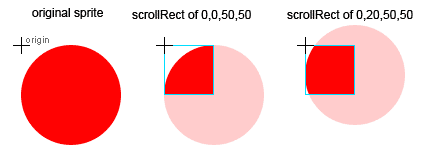
DisplayObject.scrollRect lets you specify a Rectangle object that defines the region of the DisplayObject (Sprite, MovieClip, etc) to display. The masked region is always displayed at the origin of the display object, which lets you scroll the region by changing the x and y properties of the rectangle.

// Rectangle constructor params are x, y, width, height
mySprite.scrollRect = new Rectangle(0,20,50,50);

For instance, setting the scrollRect as above would mask a 50×50 region of the sprite starting 20 pixels down, but the masked view would still be placed at the sprite’s origin, so it would appear to be scrolled 20 pixels up.

Sort of handy, but scrollRect really becomes useful when you combine it with cacheAsBitmap. When cacheAsBitmap is false, scrollRect is basically treated the same as a normal vector mask by the renderer. Vector masks are very inefficient in Flash, because the whole DisplayObject is rendered, not just the visible portion. However, when you set cacheAsBitmap to true the renderer switches to an optimized mode where it only renders the masked area of the display object to the bitmap cache, and then uses a combination of bitmap routines and incremental rendering to scroll the content. This can be used to gain very substantial performance benefits.

mySprite.cacheAsBitmap = true;
// Rectangle constructor params are x, y, width, height
mySprite.scrollRect = new Rectangle(0,20,50,50);

Note that this has the same considerations that are usually associated with cacheAsBitmap. If the display object is dirtied (ie. it changes visually), the Flash player will re-render the bitmap cache, so this technique generally does not make sense for content that is likely to change each frame (though it might if the content is much larger than the masked area). It also has memory overhead from having to maintain the bitmap cache – though I assume it would be lower because it is limited to the masked area.

Library, Timeline and Multi-File Searches in Flash

As promised, I will be giving a more in-depth look at all of the panels in our recently released Panel Pack 1 over the next little while. Hopefully this doesn’t come across as a sales pitch (we actually lose money releasing these panels), I’m just hoping to share some of the work my team has put in over the past few months polishing these up for release.

I wanted to start with gSearch, because it is the most significant panel in terms of technical complexity and functionality.

We built gSearch to address three areas of searching that we felt were lacking (or completely missing) in the Flash IDE:

Continue reading →

GPSD’06 Results Are In!

After a week of voting, the results of the Great Pumpkin Showdown 2006 are in! As always, we pitted teams of two, based on company seniority (Team 1 is most senior, Team 4 is comprised of “the new guys”) against one another in a battle of epic proportions.

PumpkInvaders, by Team 1 took the easy win with 38% of the votes (151) – go team!

Jack Skellington, by Team 4, and Frank’n’Friends by last year’s winner Team 3 took a very tight 2nd and 3rd place with 23% (91 votes) and 21% (86 votes) respectively.

Team 2’s Grumpkin started strong, but lost a lot of ground in the final days of voting and came in a disappointing 4th with 16% of the votes (66 votes).

Continue reading →

John Grden’s New Blog

I rarely blog about blogs, but for John I’m happy to make an exception. John Grden is a very smart guy, and he has an infectious enthusiasm for Flash technology. I’ve known him for a couple years – online, hanging out a conferences, and doing some training with him once at Blitz – and beyond being impressed by his technical abilities and love of learning, I’ve found he’s one of the most genuinely nice people I’ve met.

He’s always coming up with crazy ideas and working on neat things with Flash and Flex (ex. XRay, Red5, FLEXible), so I’d definitely recommend keeping an eye on his new blog, RockOnFlash.com/blog/. It’s worth heading over there now to check out the video on his FitC talk combining live drumming, Flash, streaming video, real-time data transfer, and Rush.

Rock On John!